
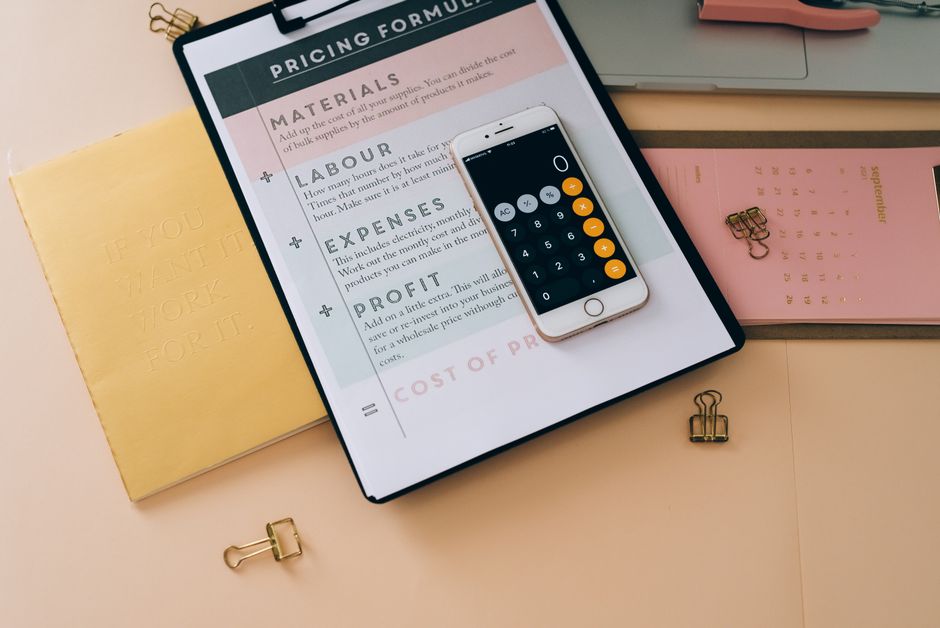
An Etsy printable shop can start with a laptop, design software, and a small testing budget. The hard part is not uploading a PDF. It is finding a problem people already pay to solve, pricing the file after fees, and building enough listings to create steady search traffic.
Is an Etsy Printable Shop a Real Business?
The basic problem digital printables solve
Digital printables exist because buyers want a finished solution without waiting for shipping. A wedding planner, debt payoff tracker, classroom worksheet, or meal-planning calendar turns a vague task into a set of pages someone can print or use on a tablet. That convenience gives the file value even though the delivery cost is close to zero.
The business model has two useful features. You create the file once, then Etsy can deliver it after each purchase. You also avoid inventory, packaging, storage, and postage. Those savings improve the gross margin, but they do not guarantee profit. Design time, listing fees, payment fees, software, advertising, refunds, taxes, and customer support still reduce the amount you keep.
Where the margin disappears
A $5 file may sound profitable until you subtract Etsy’s $0.20 listing fee, the 6.5% transaction fee, payment processing, and any advertising charge. A seller who spends three hours making a low-priced template may earn less than minimum wage if the listing never gains traffic. The business needs a repeatable production process and products that can sell at a price high enough to support that work.
Verdict: Etsy printables are a legitimate side business, but they work best as a small catalog of useful solutions rather than a lottery ticket built around one attractive cover image. Treat the shop like a microbusiness from the first sale. Track revenue, direct costs, hours, and cash set aside for taxes.
Choose a Printable Niche People Already Pay For

The best niche is not the one with the prettiest colors. It is the one where a buyer has a clear job, a deadline, and a reason to avoid creating the file from scratch. Start with a narrow customer and a narrow outcome.
Use this five-step filter
- Name the buyer: Choose a specific group such as first-time landlords, nursing students, new parents, wedding guests, or families paying down debt.
- Name the repeated task: Look for planning, tracking, organizing, teaching, budgeting, or preparing for an event.
- Check the purchase trigger: A monthly budget may sell year-round, while a graduation planner has a seasonal demand window. Both can work, but they need different listing schedules.
- Measure the competition: Search Etsy using the exact phrase a buyer might type. Record the price, number of reviews, page design, file types, and complaints in recent reviews.
- Find a useful gap: Improve one practical feature. That could mean larger writing areas, an editable version, a Sunday-start calendar, A4 and US Letter files, or instructions for tablet use.
What to avoid at the start
Do not begin with a broad shop that sells wedding invitations, preschool worksheets, fitness trackers, and business forms under one visual style. A mixed catalog makes it harder to learn which buyer responds to your work. It also makes your shop look unfinished. Pick one audience and create five related listings before expanding.
Verdict: Choose a niche with a recurring task and a visible inconvenience. Personal finance printables are especially easy to explain because the buyer can see the result: a spending log, sinking-fund tracker, or debt snowball worksheet that makes numbers easier to manage. Do not promise financial outcomes. Sell organization and clarity.
Validate Demand Before You Design
My strongest recommendation is to spend one evening validating a product idea before spending a weekend designing it. Search Etsy, Google, Pinterest, and relevant social communities for the buyer’s exact problem. A promising idea has several competing listings, recent reviews, prices that leave room for fees, and complaints you can solve. A blank market can mean an opportunity, but it can also mean buyers do not want the product.
Use a simple score from zero to two for each factor: clear buyer, urgent task, recent demand, manageable competition, and realistic price. A score of eight or higher earns a first prototype. A score below six belongs in your idea bank, not in your paid software queue. The recommendation is simple: validate with evidence from buyers before you make a polished cover.
Read negative reviews closely. If buyers complain that a budget sheet is confusing, that is useful market research. If they complain that the download contains only one size, offer multiple page sizes. If they complain that a template cannot be edited, do not copy the same limitation. Avoid copying layout, wording, illustrations, or branding from another seller. Improve the problem, not the competitor’s file.
Set a test limit before launch: five listings, $25 to $50 in optional promotion, and 30 days of data. Judge visits, favorites, conversion rate, messages, and refunds together. One sale is encouraging; it is not proof of a profitable system. Verdict: launch only after the idea passes a written demand test, and stop improving a weak idea when the buyer evidence stays weak.
Build a Lean Budget and Price for Profit

The money plan should be finished before the shop opens. Etsy charges a $0.20 listing fee and a 6.5% transaction fee. Payment processing varies by seller location; for a U.S. account, the standard example is 3% plus $0.25 per order. Etsy may also charge an Offsite Ads fee when a sale comes through that program. Read the current Etsy fees policy before setting prices because country rules and programs can change.
A realistic first-month budget
| Expense | Lean amount | What it covers |
|---|---|---|
| Etsy listing fees | $5 | Twenty-five listings at $0.20 each |
| Design software | $0 to $15 | Free plan first, or one month of Canva Pro at about $15 |
| Font or graphic license | $0 to $20 | Only assets with commercial-use rights |
| Testing and promotion | $0 to $50 | Optional ads or controlled traffic tests |
| Cash reserve | $50 to $100 | Refunds, tax savings, or unexpected fees |
| Total | $55 to $190 | Before income taxes and owner pay |
Set a price that survives the fees
Suppose you sell a $7 printable to a U.S. buyer. The $0.20 listing fee, roughly $0.46 transaction fee, and about $0.46 payment-processing fee leave approximately $5.88 before taxes, software, refunds, or advertising. If an Offsite Ads fee applies, the amount can fall by another 12% or 15%, depending on Etsy’s rules and your shop status.
A $12 bundle leaves roughly $10.41 before those extra costs under the same basic fee assumptions. That is why bundles usually make better first products than isolated one-page files. Canva Pro costs about $15 per month on its monthly plan, while Adobe Express Premium is commonly listed near $9.99 per month; verify the current price on the Canva pricing page or Adobe Express pricing page before subscribing. Creative Fabrica’s All Access plan is another common design-asset option, often priced around $12 per month when billed annually, but its license terms deserve careful review.
Do not put the first $200 of costs on a credit card at a 20% to 30% APR unless you can repay it from cash. A printable shop has uncertain sales, so debt interest can turn a small experiment into a monthly obligation. Verdict: start with free tools, price most useful bundles between $7 and $15, and upgrade software only when the shop’s sales justify the recurring bill.
Create Files That Work on Paper and Screens
The buyer is paying for reduced effort. A file that looks good in a listing thumbnail but prints badly will create refunds and poor reviews. Build the product around use, not decoration.
Use a production checklist
- Create US Letter and A4 versions. Add A5 only when the layout still has enough writing space.
- Export a high-quality PDF with readable text, strong contrast, and margins that ordinary home printers will not cut off.
- Include an editable version only if the license for your fonts, illustrations, and template elements allows that use.
- Add a one-page instruction sheet that explains downloading, printing, tablet annotation, and the included file types.
- Open every file on a phone, laptop, and tablet. Print a sample page at 100% scale before publishing.
- Use a clean file naming system such as debt-tracker-us-letter.pdf and debt-tracker-a4.pdf.
Copyright is a business risk
Canva Pro, Adobe Express, Creative Fabrica, Microsoft PowerPoint, and other tools may provide assets that look ready for resale. That does not mean every asset can become the main value of an Etsy download. Read the commercial-use and template-resale rules for the exact asset. Do not use Disney characters, sports logos, celebrity images, trademarked slogans, or another designer’s clip art without permission. A takedown can remove a listing just when it starts gaining traffic.
Do not promise a result such as eliminating debt, raising a credit score, or making a buyer financially independent. A printable can help someone organize information, but it does not replace tax, legal, or investment advice. For a personal-finance product, include a short scope statement and a date on the worksheet so buyers know when the assumptions were created.
Verdict: a plain file with excellent instructions beats a stylish file that cannot be printed, edited, or understood. Test the customer experience yourself before asking strangers to pay for it.
Build Search Traffic Without Burning Cash

For a new shop, the strongest traffic strategy is a small cluster of closely related listings. Publish five products for one buyer, then connect them through clear titles, matching thumbnails, and descriptions that explain the use case in ordinary language. Avoid stuffing every title with the same keyword.
Use a 30-day launch routine
- Days 1-7: Publish two products and collect search phrases from Etsy autocomplete, customer questions, and competitor reviews.
- Days 8-14: Publish two related products. Improve thumbnails so the page size, file type, and main benefit can be understood quickly.
- Days 15-21: Publish a bundle that combines the strongest features. Price it above the individual files but below their combined price.
- Days 22-30: Review visits, favorites, conversion rate, messages, and refunds. Change one variable at a time.
Use Etsy Ads only after the listing earns clicks from normal search or outside traffic. Ads can buy visits, but they cannot fix a weak product page. A $20 test that produces no sale is information, not permission to spend another $200. Promote through useful examples, such as a screenshot showing how a sinking-fund tracker works, rather than posting a repeated sales pitch.
Do not judge the shop by follower count. A printable business needs profitable orders, not applause. Verdict: build a narrow catalog first, improve the listings that attract qualified visitors, and cap promotion spending until the numbers show that each sale leaves cash after fees.
Taxes, Refunds, and the 90-Day Go-or-Stop Decision
Do I need a separate bank account?
Open one if you can. A separate account makes it easier to see gross sales, Etsy fees, software charges, refunds, and the amount available for personal use. Save receipts and export monthly payment records. Marketplace platforms may collect certain sales taxes from buyers, but that does not remove your responsibility to report business income or follow local rules. Keep a tax reserve of roughly 25% to 30% of profit as a cautious starting point, then ask a qualified tax professional about your location and business structure.
What should I do when a buyer wants a refund?
Digital-download disputes often come from confusion rather than fraud. Reply with the file name, download steps, and a plain explanation of what the purchase includes. If the file is defective, fix it quickly and consider a refund. Never send an angry message over a low-dollar order; a poor review can cost more than the original sale. Update the instruction sheet when the same question appears twice.
When should I stop?
After 90 days, review the shop by product. Keep listings that receive qualified visits, sales, or useful buyer feedback. Rewrite or retire listings that receive no interest after a fair test. If the shop earns $300 in revenue but costs $240 in software, ads, refunds, fees, and supplies, it is not yet a profitable side hustle. If sales are growing while your hours per listing fall, reinvest carefully.
This is not financial advice. Tax treatment, business registration, consumer rules, and deductible expenses depend on your location and facts. The practical bottom line is clear: start with a small cash budget, avoid high-APR debt, protect your files with proper licenses, and measure profit instead of gross sales.
That turns the original laptop-and-PDF idea into a controlled experiment. If the first five listings solve a real money-management problem and leave cash after every fee, expand the catalog. If they do not, you have limited the loss and learned what to test next.
Disclaimer: The information on this page is for educational purposes only and does not constitute financial advice. Rates, terms, and eligibility requirements are subject to change. Always compare multiple lenders and consult a licensed financial advisor before borrowing.